Week1:
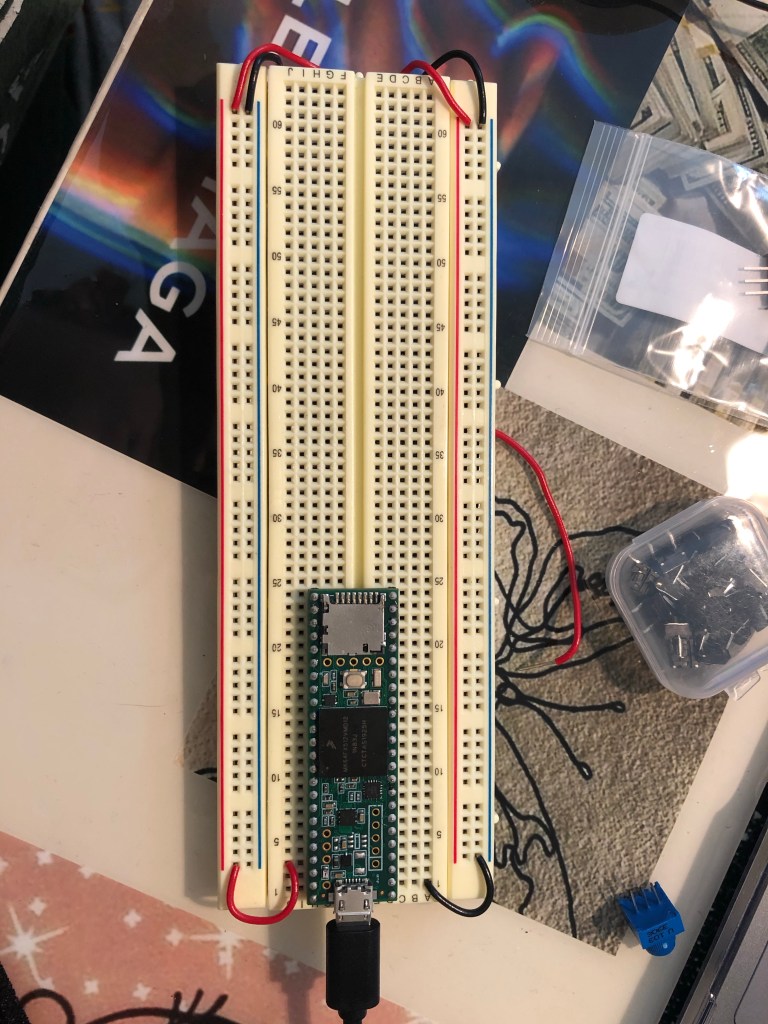
Teensy: Got it workin’ !
2. Arduino Research
My google search was “Arduino Microphones” and this video was the first thing that popped up.
It shows how sound sensors can be used for a variety of things, one of them could be turning lights off and on by clapping. Here they used an Arduino to hook up the sound sensor to an array of LED lights which will beat with music, clapping or knocking. I though it was interesting to see how the “microphone” was able to pick up the sound of a song, or even a noise such as clapping and then automate an LED to go off. Definitely a project I would like to try in Digital.
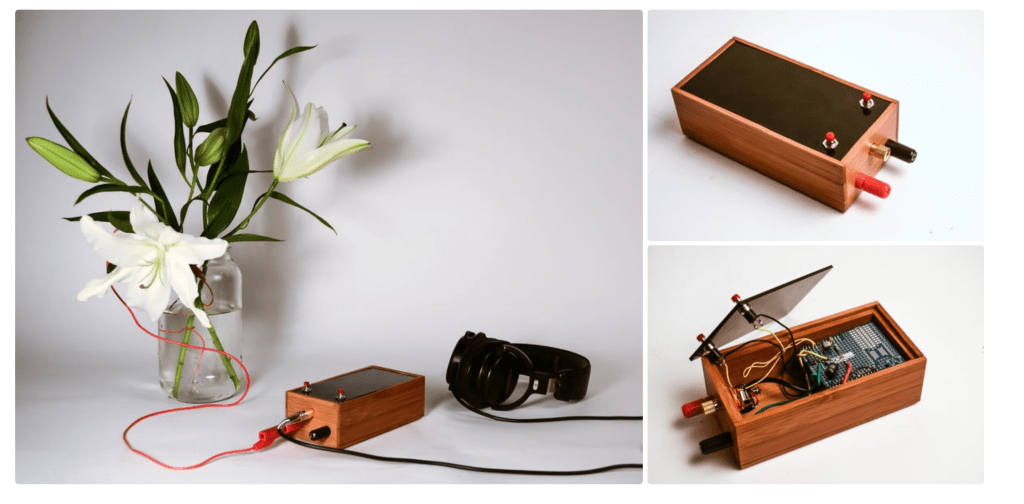
Arduino Singing Plant
Here in this project, they made a plant, which is conductive, into a theremin like instrument. By connecting a capacitance sensor to a plant they could detect if people were touching it and converted the touch into sound. This would happen with a theremins like interface. Though it is interesting using a plant to make music, I would like to see if the sound could then be recording to program into a midi sound or beat.
LED Controller
This is something, I’ve been interested in for a while, and its an LED controller. Instead of spending a bunch of money on LED lights, you can program them and make them change colors yourself. However, in this specific project it seems as though the person developed their own app, and then just made an on/off switch for one singular LED. I’m curious, if there’s a way to do a strip of connected LED lights and then somehow make them move to the sound of music, I think that would be insanely interesting.
Arduino Audio Spectrum Visualizer
This project takes the different frequencies from different songs and places them on a 32 x 8 LED matrix display to show the waves through LEDs. With an Audio Input it allows for 18.6Khz. The intended purpose of this project is to display frequency spectrum of audio music signal. By the press of a button, the creator was able to change the placement of the sound waves on the matrix display from the top to bottom (to change the visual effect).
Arduino Punch Activated Flamethrower
This was definitely one of the more, crazy/experimental projects I had researched. HOWEVER, who doesn’t want to fire bend… Anyways. This project seems to have a lot of moving parts, no pun intended, when it comes to the use of fire. There’s many precautions taken when creating the butane feature and dismantling a lighter. The flamethrower part of this project is composed of a butane fuel chamber and a solenoid valve. At the business end there is a modified arc lighter. The punch activated part of this project is an Arduino Pro Mini and an accelerometer. Despite this not being a safe nor beginner project, I do find it extremely interesting.
Final Projects From Years Past:
- Nick Royall: I really enjoyed watching the video demo for this project. I though it was interesting how there were so many different “modes” from audio sequencers mode to midi keyboard mode. It really opened up all the possibilities for future projects.
- Lauren Schutz: I know that once we are further into Digital lab we’ll get a better understanding of what we can possibly do with all the information and tools supplied, but I never thought that art such as paintings and breadboards could be combined. Lauren made a Touch-LED painting, where once you touched one of the flowers it lit up, and added color to the black and white painting.
- Dominic Yuan: I was extremely compelled by this project. The project was a Sound Reactive visualizer. Basically whenever anything was playing while hooked up to his device it would light up and change colors based on intensity of the music played.
- Ethan Bailey: I thought this project was interesting because the microphone was able to match the pitch to the note on the glockenspiel. It reminds me of the voice box. machines, where you sing into some sort of microphone, or tube and it alters your voice. I wonder if both of those concepts could be combined into one. If so, I wonder how I would be able to take the end result of that and then go even further by putting it into a song.
- Cody Martinez: Taking something that you may have laying around, that you no longer use, but then modifying it to something of use has always been extremely fascinating to me. This project was able to take an old keyboard into a synthesizer. The synthesizer was then able to be recorded and placed into a song. It was able to change the wave shape, oscillator, ADSR envelopes, and low pass filter.
Brainstorm!!
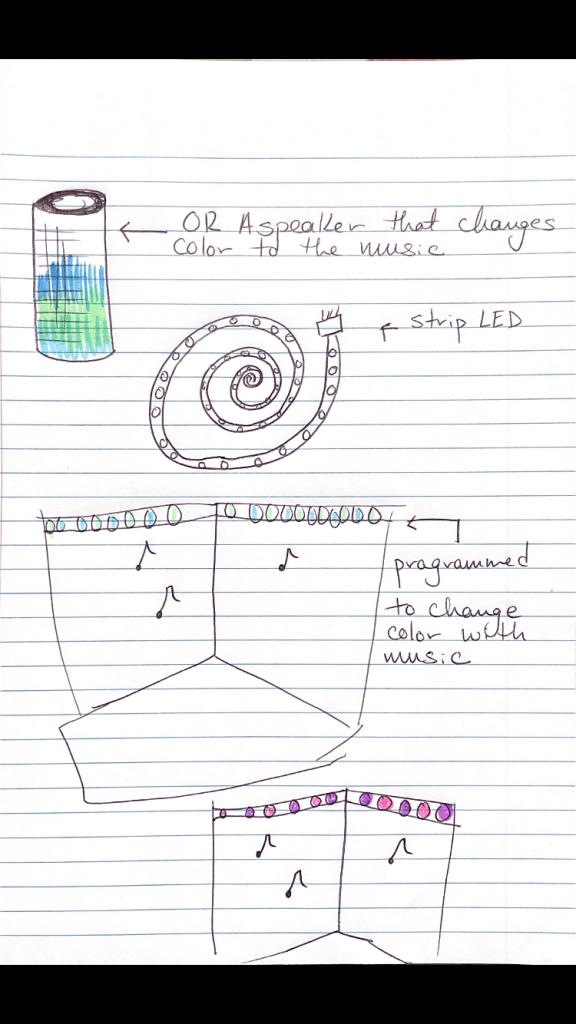
So my idea, is to create an LED light strip that
- Changes to different patterns rather than generic flashes or strobing colors.
- Moves to the sound of music through bluetooth.
A controllable RGB Strip synced to music.
Week 2 Lab Report:
Part 1:
Part 2 (LED);
Part 3 (Buttons):
Part 4 (Serial Print):
Part 5 (Potentiometer):
Part 6 (Code):
int ledRedPin=2;        // Make a variable for the digital output pin
int ledYellowPin=3;
int ledGreenPin= 4;
int ledBluePin=5;
int buttonPin=33;
int otherbuttonPin=34;
int togswitchPin=35;
int potValue= 0;
void setup() {
  pinMode(ledRedPin,OUTPUT); // set the digital pin 32 to an OUTPUT
  pinMode(ledYellowPin,OUTPUT);
  pinMode(ledGreenPin,OUTPUT);
  pinMode(ledBluePin,OUTPUT);
  pinMode(buttonPin,INPUT);
  pinMode(otherbuttonPin,INPUT);
  pinMode(togswitchPin,INPUT);

}
void loop() {
  potValue= analogRead(A13);

  if(digitalRead(buttonPin)== HIGH) {

    digitalWrite(ledRedPin,HIGH);
    digitalWrite(ledYellowPin,HIGH);
    digitalWrite(ledGreenPin,HIGH);
    digitalWrite(ledBluePin,HIGH);
    delay(potValue);              //pause 1 second
    digitalWrite(ledRedPin,LOW);
    digitalWrite(ledYellowPin,LOW);
    digitalWrite(ledGreenPin,LOW);
    digitalWrite(ledBluePin,LOW);
    delay(potValue);            // pause 1 second

 }
  if (digitalRead(otherbuttonPin) == HIGH)
  if (digitalRead(togswitchPin)==LOW) {
    digitalWrite(ledRedPin, HIGH);
    delay(potValue);
    digitalWrite(ledRedPin,LOW);
    delay(potValue);
    digitalWrite(ledYellowPin,HIGH);
    delay(potValue);
    digitalWrite(ledYellowPin,LOW);
    delay(potValue);
    digitalWrite(ledGreenPin,HIGH);
    delay(potValue);
    digitalWrite(ledGreenPin,LOW);
    delay(potValue);
    digitalWrite(ledBluePin,HIGH);
    delay(potValue);
    digitalWrite(ledBluePin,LOW);
    delay(potValue);

  }
if (digitalRead(togswitchPin)==HIGH)
if (digitalRead(otherbuttonPin)==HIGH) {
    digitalWrite(ledBluePin, HIGH);
    delay(potValue);
    digitalWrite(ledBluePin,LOW);
    delay(potValue);
    digitalWrite(ledGreenPin,HIGH);
    delay(potValue);
    digitalWrite(ledGreenPin,LOW);
    delay(potValue);
    digitalWrite(ledYellowPin,HIGH);
    delay(potValue);
    digitalWrite(ledYellowPin,LOW);
    delay(potValue);
    digitalWrite(ledRedPin,HIGH);
    delay(potValue);
    digitalWrite(ledRedPin,LOW);
    delay(potValue);

}
 }
Week 3 Lab Report:
int ledPin1 = 2;
int ledPin2 = 3;
int ledPin3 = 4;
int ledPin4 = 5;
int buttonPin1 = 33;
int buttonPin2 = 34;
int buttonPin3 = 35;
int buttonPin4 = 36;
int potPin = A18;
int potValue = 0;
int switchPin = 38;
void setup() {
  pinMode(ledPin1, OUTPUT);
  pinMode(ledPin2, OUTPUT);
  pinMode(ledPin3, OUTPUT);
  pinMode(ledPin4, OUTPUT);
  pinMode(buttonPin1, INPUT);
  pinMode(buttonPin2, INPUT);
  pinMode(buttonPin3, INPUT);
  pinMode(buttonPin4, INPUT);
  pinMode(potValue, INPUT);
  pinMode(switchPin, INPUT);
  Serial.begin(9600);
}
void checkButton(int buttonPin, int ledPin, int note) {
  if (digitalRead(buttonPin) == HIGH) {
    usbMIDI.sendNoteOn(note, 127, 1);
    digitalWrite(ledPin, HIGH);
    delay(500);
    usbMIDI.sendNoteOff(note, 0, 1);
    digitalWrite(ledPin, LOW);
    delay(500);
  }
}
void keyboardMode() {
  checkButton(buttonPin1, ledPin1, 60);
  checkButton(buttonPin2, ledPin2, 64);
  checkButton(buttonPin3, ledPin3, 67);
  checkButton(buttonPin4, ledPin4, 71);
}
void arpeggio(int note) {
  potValue = analogRead(potPin);
  digitalWrite(ledPin1, HIGH);
  usbMIDI.sendNoteOn(note, 127, 1);
  delay(potValue);
  digitalWrite(ledPin1, LOW);
  usbMIDI.sendNoteOff(note, 0, 1);
  digitalWrite(ledPin2, HIGH);
  usbMIDI.sendNoteOn(note + 4, 127, 1);
  delay(potValue);
  digitalWrite(ledPin2, LOW);
  usbMIDI.sendNoteOff(note + 4, 0, 1);
  digitalWrite(ledPin3, HIGH);
  usbMIDI.sendNoteOn(note + 7, 127, 1);
  delay(potValue);
  digitalWrite(ledPin3, LOW);
  usbMIDI.sendNoteOff(note + 7, 0, 1);
  digitalWrite(ledPin4, HIGH);
  usbMIDI.sendNoteOn(note + 11, 127, 1);
  delay(potValue);
  digitalWrite(ledPin4, LOW);
  usbMIDI.sendNoteOff(note + 11, 0, 1);
}
void arpeggiatorMode() {
  if (digitalRead(buttonPin1) == HIGH) {
    arpeggio(60);
  }
  if (digitalRead(buttonPin2) == HIGH) {
    arpeggio(64);
  }
  if (digitalRead(buttonPin3) == HIGH) {
    arpeggio(67);
  }
  if (digitalRead(buttonPin4) == HIGH) {
    arpeggio(71);
  }
}
void loop() {
  if (digitalRead(switchPin) == HIGH) {
    keyboardMode();
  }
  if (digitalRead(switchPin) == LOW) {
    arpeggiatorMode();
  }
}
Week 4 Lab Report:
Week 5 Lab Report:
int ledPinArray[4] = {1, 2, 3, 4};
int totalLeds = 4;
int switchPinOn = 32;
int switchPinOctave = 31;
int switchPinBack = 30;
int potPinArray[4] = {A14, A15, A16, A17};
int potPin5 = A18;
int potValArray[4] = {0, 0, 0, 0};
int potVal5 = 0;
int mappedPotValArray[4] = {0, 0, 0, 0};
int mappedPotVal5 = 0;
int octave = 12;
void setup() {
  for (int i = 0; i < totalLeds; i++) {
    pinMode(ledPinArray[i], OUTPUT);
  }
  pinMode(switchPinOn, INPUT);
  pinMode(switchPinOctave, INPUT);
  pinMode(switchPinBack, INPUT);
}
void sequenceBackward() {
  for (int i = 3; i >= 0; i--) {
    potValArray[i] = analogRead(potPinArray[i]);
    mappedPotValArray[i] = map(potValArray[i], 0, 1023, 60, 72) + octave;
    digitalWrite(ledPinArray[i], HIGH);
    usbMIDI.sendNoteOn(mappedPotValArray[i], 127, 1);
    delay(mappedPotVal5);
    digitalWrite(ledPinArray[i], LOW);
    usbMIDI.sendNoteOff(mappedPotValArray[i], 0, 1);
    delay(mappedPotVal5);
  }
}
void sequenceForward() {
  for (int i = 0; i < totalLeds; i++) {
    potValArray[i] = analogRead(potPinArray[i]);
    mappedPotValArray[i] = map(potValArray[i], 0, 1023, 60, 72) + octave;
    digitalWrite(ledPinArray[i], HIGH);
    usbMIDI.sendNoteOn(mappedPotValArray[i], 127, 1);
    delay(mappedPotVal5);
    digitalWrite(ledPinArray[i], LOW);
    usbMIDI.sendNoteOff(mappedPotValArray[i], 0, 1);
    delay(mappedPotVal5);
  }
}
void loop() {
  //octave
  if (digitalRead(switchPinOctave) == HIGH) {
    octave = 12;
  } else {
    octave = 0;
  }
  //tempo
  potVal5 = analogRead(A18);
  mappedPotVal5 = map(potVal5, 0, 1023, 100, 1000);
  if (digitalRead(switchPinOn) == HIGH) {
    if (digitalRead(switchPinBack) == LOW) {
      sequenceForward();
    }
    if (digitalRead(switchPinBack) == HIGH) {
      sequenceBackward();
    }
  }
}
Week 6 Lab Report:
Week 7 Lab Report:
#include <Adafruit_NeoPixel.h>
Adafruit_NeoPixel neopixel = Adafruit_NeoPixel(2, 32, NEO_RGB);
int tempo = 1000;
int redPot = A14;
int greenPot = A15;
int bluePot = A16;
int buttonPin = 36;
int redVal = 0;
int greenVal = 0;
int blueVal = 0;
bool lastButton1State = LOW;
bool button1State = LOW;
bool switchedOn = false;
void setup() {
  neopixel.begin();
  neopixel.clear();
  neopixel.show();
  pinMode(buttonPin, INPUT);
}
void checkButton() {
  lastButton1State = button1State;
  button1State = digitalRead(buttonPin);
  if (lastButton1State == LOW && button1State == HIGH) {
    flipButtonState();
    delay(5);
  } else if (lastButton1State == HIGH && button1State == LOW) {
    delay(5);
  }
}
void flipButtonState() {
  if (switchedOn == true) {
    switchedOn = false;
  } else if (switchedOn == false) {
    switchedOn = true;
  }
}
void checkPot() {
  redVal = map(analogRead(redPot), 0, 1023, 0, 255);
  greenVal = map(analogRead(greenPot), 0, 1023, 0, 255);
  blueVal = map(analogRead(bluePot), 0, 1023, 0, 255);
}
void updateLed() {
  if (switchedOn == true) {
    neopixel.setPixelColor(0, redVal , greenVal, blueVal);
    neopixel.setPixelColor(1, redVal , greenVal , blueVal );
    neopixel.show();
  } else {
    neopixel.setPixelColor(0, 0, 0, 0);
    neopixel.setPixelColor(1, 0, 0, 0);
    neopixel.show();
  }
}
void loop() {
  redVal = analogRead(A14);
  greenVal = analogRead(A15);
  blueVal = analogRead(A16);
  checkButton();
  checkPot();
  updateLed();

}
Push On/Off Explanation: The checkbutton() function is always reading into the state of the button to check if it’s on or off. The flipButtonState() function allows for whichever the bool variable switchedOn() to change the original value of it to whatever it’s opposite was. (i.e. If it was false, then it was changed to true. And true was changed to false).
Week 8 Lab Report :
int buttonPin[4] = {32, 31, 30, 29};
int ledPin[4] = {2, 3, 4, 5};
bool lastButton1State[4] = {LOW, LOW, LOW, LOW};
bool button1State[4] = {LOW, LOW, LOW, LOW};
bool switchedOn[3][4] = {
  {LOW, HIGH, LOW, HIGH},
  {LOW, HIGH, HIGH, HIGH},
  {LOW, LOW, LOW, HIGH}
};
int currentStep = 0;
unsigned long lastStepTime = 0;
int totalSteps = 4;
int tempo = 1000;
int tempoPot = A19;
int channelDisplayed = 0;
int channelLedPins[3] = {34, 35, 36};
int channelButtonPin = 33;

bool buttonState = LOW;
bool lastButtonState = LOW;

int midiNotes [3] = {60, 64, 67};


void setup() {
  for (int i = 0; i < totalSteps; i++) {
    pinMode(ledPin[i], OUTPUT);

  }
  for (int i = 0; i < 4; i++) {
    pinMode(buttonPin[i], INPUT);
  }
  for (int i = 0; i < 3; i++) {
    pinMode(channelLedPins[i], OUTPUT);
  }
  pinMode(channelButtonPin, INPUT);
}


void loop() {
  checkButton();
  checkButtons();
  updateLeds();
  updateChannelLeds();
  stepForwards();
}

void checkButtons() {

  for (int i = 0; i < 4; i++) {
    lastButton1State[i] = button1State[i];
    button1State[i] = digitalRead(buttonPin[i]);
    if (lastButton1State[i] == LOW && button1State[i] == HIGH) {
      switchedOn[channelDisplayed][i] = !switchedOn[channelDisplayed][i]; // this means: if switchedOn is true then set it to false, if switchedOn is false then set it to true
      delay(5);
    } else if (lastButton1State[i] == HIGH && button1State[i] == LOW) {
      delay(5);
    }

  }

}

void updateLeds() {
  for (int i = 0; i < 4; i++) {
    if (switchedOn[channelDisplayed][i] == true or i == currentStep) {
      digitalWrite(ledPin[i], HIGH);
    } else {
      digitalWrite(ledPin[i], LOW);
    }

  }
}

void stepForwards() {
  tempo = analogRead(A19);

  if (millis() > lastStepTime + tempo) {
    lastStepTime = millis();
    //usbMIDI.sendNoteOff(65, 0, 1);
    for (int i = 0; i < 3; i++) {
      usbMIDI.sendNoteOff(midiNotes[i], 0, 1);

    }
    //digitalWrite(ledPin[currentStep], LOW);
    countUp();
    //digitalWrite(ledPin[currentStep], HIGH);
    for (int i = 0; i < 3; i++) {
      if (switchedOn[i][currentStep] == HIGH) {
        usbMIDI.sendNoteOn(midiNotes[i], 127, 1);

      }

    }

  }
}

void countUp()  {
  currentStep++;
  if (currentStep == totalSteps) {
    currentStep = 0;

  }
}

void checkButton() {
  lastButtonState = buttonState;
  buttonState = digitalRead(channelButtonPin);
  if (lastButtonState == LOW and buttonState == HIGH) {
    countUpCh();
    delay(5);
  } else if (lastButtonState == HIGH and buttonState == LOW) {
    delay(5);
  }
}

void countUpCh() {
  channelDisplayed++;
  if (channelDisplayed >= 3) {
    channelDisplayed = 0;
  }

}

void updateChannelLeds() {
  for (int i = 0; i < 3; i++) {
    if (i == channelDisplayed) {
      digitalWrite(channelLedPins[i], HIGH);

    } else {
      digitalWrite(channelLedPins[i], LOW);

    }
  }
}
Week 9 Lab Report:
bool sequences[3][4] = {
  {HIGH, LOW, HIGH, LOW},
  {LOW, HIGH, HIGH, LOW},
  {HIGH, LOW, HIGH, HIGH}
};

int sequenceLedPins[4] = {2, 3, 4, 5};
int currentChannel = 0;

int channelLedPins[3] = {34, 35, 36};
int channelButtonPin = 33;

bool buttonState = LOW;
bool lastButtonState = LOW;
void setup() {

  for (int i = 0; i < 4; i++) {
    pinMode(sequenceLedPins[i], OUTPUT);
  }
  for (int i = 0; i < 3; i++) {
    pinMode(channelLedPins[i], OUTPUT);
  }
  pinMode(channelButtonPin, INPUT);
}


void loop() {
  checkButton();
  updateLeds();

}

void updateLeds() {
  updateSequenceLeds();
  updateChannelLeds();

}


void checkButton() {
  lastButtonState = buttonState;
  buttonState = digitalRead(channelButtonPin);
  if (lastButtonState == LOW and buttonState == HIGH) {
    countUp();
    delay(5);
  } else if (lastButtonState == HIGH and buttonState == LOW) {
    delay(5);
  }

}

void countUp() {
  currentChannel++;
  if (currentChannel >= 3) {
    currentChannel = 0;
  }

}

void updateSequenceLeds() {
  for (int i = 0; i < 4; i++) {
    digitalWrite(sequenceLedPins[i], sequences[currentChannel][i]);
  }

}

void updateChannelLeds() {
  for (int i = 0; i < 3; i++) {
    if (i == currentChannel) {
      digitalWrite(channelLedPins[i], HIGH);

    } else {
      digitalWrite(channelLedPins[i], LOW);

    }
  }
}
Lab Report 10:
import processing.serial.*;

Serial teensySerial;

int inputVal=0;
int inputVal2=0;
int inputVal3 = 0;
int inputVal4=0;
int inputVal5=0;

int circleSize=0;
int circleX=0;
int circleSpeed =0;
int circleY=0;


void setup() {
  frameRate(30);
  size(500, 500);

  //printArray(Serial.list());
  String usbPortName = Serial.list()[1];
  print(usbPortName);
  teensySerial = new Serial(this, usbPortName, 9600);
}

void draw() {

  if (teensySerial.available()>=6) {
    inputVal = teensySerial.read();
    if (inputVal == 0) {
      inputVal=teensySerial.read();
      inputVal2=teensySerial.read();
      inputVal3=teensySerial.read();
      inputVal4=teensySerial.read();
      inputVal5=teensySerial.read();

    }
  }
  background(inputVal4, 0, inputVal5);
  fill(0, 0, inputVal);
  circleSize= (int)map(inputVal2, 1, 255, 0, 500);
  circleSpeed=(int)map(inputVal3, 1, 255, 1, 50);
  circleX+=circleSpeed;
  if (circleX>500) {
    circleX=0;
  }


  circle(circleX, 250, circleSize);

}
int potPin = A14;
int potVal = 0;
int mappedPotVal = 0;

int potPin2 = A15;
int potVal2 = 0;
int mappedPotVal2 = 0;

int potPin3= A16;
int potVal3 = 0;
int mappedPotVal3 = 0;

int potPin4=A17;
int potVal4 = 0;
int mappedPotVal4 = 0;

int potPin5= A13;
int potVal5 = 0;
int mappedPotVal5 = 0;

void setup() {
  Serial.begin(9600);


}

void loop() {

  Serial.write(0);


  potVal = analogRead(potPin);
  mappedPotVal = map(potVal, 0, 1023, 1, 255);
  Serial.write(mappedPotVal);

  potVal2 = analogRead(potPin2);
  mappedPotVal2 = map(potVal2, 0, 1023, 1, 255);
  Serial.write(mappedPotVal2);

  potVal3 = analogRead(potPin3);
  mappedPotVal3 = map(potVal3, 0, 1023, 1, 255);
  Serial.write(mappedPotVal3);

  potVal4 = analogRead(potPin4);
  mappedPotVal4 = map(potVal4, 0, 1023, 1, 255);
  Serial.write(mappedPotVal4);

  potVal5 = analogRead(potPin5);
  mappedPotVal5 = map(potVal5, 0, 1023, 1, 255);
  Serial.write(mappedPotVal5);

  delay(50);


}
Week 11 Lab Report:
#include "Button.h"

Button buttonOne(33, 60);
Button buttonTwo(34, 62);
Button buttonThree(35, 64);
Button buttonFour(36, 65);

void setup() {
  Serial.begin(9600);
  buttonOne.pressHandler(onPress);
  buttonOne.releaseHandler(onRelease);
  buttonTwo.pressHandler(onPress);
  buttonTwo.releaseHandler(onRelease);
  buttonThree.pressHandler(onPress);
  buttonThree.releaseHandler(onRelease);
  buttonFour.pressHandler(onPress);
  buttonFour.releaseHandler(onRelease);
}

void loop() {

  buttonOne.process();
  buttonTwo.process();
  buttonThree.process();
  buttonFour.process();

}

void onPress(int buttonNumber) {
  Serial.print(buttonNumber);
  Serial.println(" pressed");
  usbMIDI.sendNoteOn(buttonNumber, 127, 1);
}

void onRelease(int buttonNumber) {
  Serial.print(buttonNumber);
  Serial.println(" released");
  usbMIDI.sendNoteOff(buttonNumber, 0, 1);

}
Each one is using a ___Function___ as a __Variable_.
 Sophia's Electronics Blog